
Sourcing Guide
Keep each crane slack-adjuster reference tied to its axle position, installed side, spline detail, arm layout and old-part photos before requesting a replacement.

A mobile crane can have several visually similar automatic slack adjusters across its axles. The brand name and a loose product photo are useful search clues, but they do not identify the exact brake position. For a dependable enquiry, keep the complete reference, front or rear axle, installed side, spline interface and arm layout on the same line.
Our XCMG, Sany and Zoomlion crane slack-adjuster family brings together 11 catalog records. Those records are a sourcing index, not a statement that all 11 parts interchange. Treat each code as a separate candidate until the old component and vehicle evidence agree.
Begin with a wide photograph of the installed brake position. Include the brake chamber, pushrod, adjuster arm and camshaft area. Record whether the component is on the front or rear axle and on the vehicle's left or right side. For a multi-axle crane, add an axle number or axle-nameplate photograph so that two similar components do not become mixed on the workshop bench.
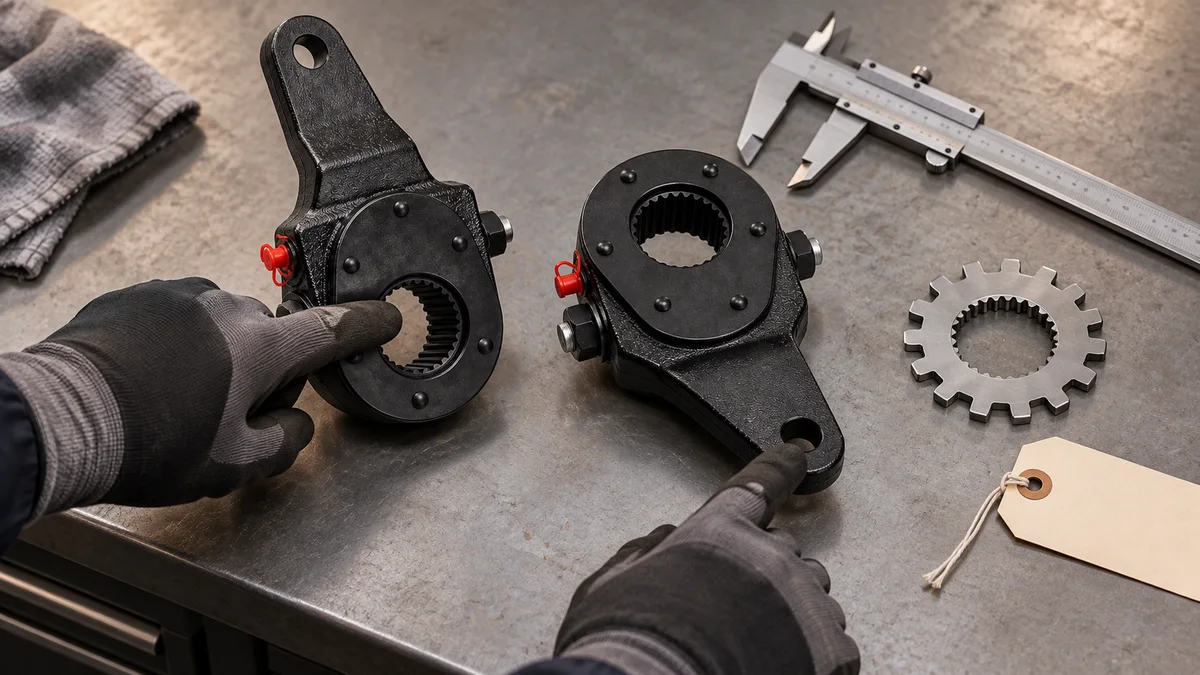
After removal, photograph both faces of the adjuster, the full arm profile, the arm-end hole and the splined opening. Keep the readable marking in a separate close-up. If a suffix is worn away, mark it as unreadable instead of reconstructing it from a similar catalog code.
| Catalog reference | Recorded clue | Evidence required before confirmation |
|---|---|---|
| 47480-1811 | Crane application family | Position, side, spline or tooth detail and old-part photos |
| HVI373E | Crane chassis | Full marking, spline close-up, arm profile and installed view |
| W3501205-95A | Position and side require confirmation | Axle record, left/right position and old-part comparison |
| SL1260D3-3502205-1HZ | Position and side require confirmation | Complete suffix, spline detail, arm-end hole and installed view |
| 3201180-F64ER / 3201280-F64ER | Front-axle signal in the catalog record | Confirm the exact reference, side and spline detail on the actual crane |
| 3501170G1-Z | Crane application family | Full number, axle position, side and old-part photos |
| 3501170XJ16A-Z | Crane chassis | Installed orientation, spline opening and arm geometry |
| 3501130G1-Z | Position and side require confirmation | Full number, axle record and both faces of the removed part |
| 3501130ZY11A-Z | Position and side require confirmation | Keep the ZY11A suffix visible; compare spline and arm layout |
| 3501130XJ16A-Z | Position and side require confirmation | Keep the XJ16A suffix visible; compare installed and removed views |
| SL1260Z-3502210Z / SL1260Z-3502205Z | Two distinct recorded references | Do not shorten the code; confirm position, spline and old part |
The catalog family associates these records with XCMG, Sany and Zoomlion crane applications. It does not provide a universal spline count, arm length or left/right mapping for the complete family. Those details must come from the actual part, an applicable parts record or a verified drawing.
The spline opening must agree with the brake camshaft. Photograph it straight-on with enough light to show the teeth. Record a tooth count only when it can be established reliably. An angled mobile-phone image is evidence for shape, but it is a poor basis for counting fine splines.
The arm geometry includes the center-to-end relationship, offset and end-hole layout. Similar black housings can carry different arms. Place the old and proposed parts in the same orientation and photograph their full profiles rather than comparing cropped catalog images.
The brake-chamber connection must line up with the installed pushrod without forcing the linkage. The installed side and axle position must also match the vehicle record. These four checks belong together; passing one does not establish the other three.
References such as 3501130G1-Z, 3501130ZY11A-Z and 3501130XJ16A-Z share a numerical stem, but their suffixes remain part of the identification. Do not collapse them to “3501130” on a purchase list. The same care applies to 3201180-F64ER and 3201280-F64ER, and to the two SL1260Z references. A shortened code can hide the distinction that the supplier needs to review.
Keep one row per required brake position, even when two rows appear identical at first. Add quantity only after the reference and position evidence are complete. This also makes receiving inspection easier: the carton label, purchase line and vehicle position can be checked as a set.
Crane slack adjusters can be combined with other brake parts and regular maintenance items in one shipment. Consolidation should not merge the technical records. Keep a separate reference, quantity, crane identifier, axle position and photo set for every adjuster line.
Send the full part number, crane brand and model, axle position, installed side, required quantity and old-part photos through the parts enquiry form. We can review the available catalog clues and identify which details still require confirmation before quotation.
The cover and inspection scene are AI-generated product illustrations based on the product-family reference. They do not document an actual workshop, shipment or completed fitment test.
Use this guide to organize a clearer quote request instead of choosing from a short product list.
Part number, truck brand, model, engine model, chassis number and old-part photos help confirm the correct replacement before quotation.
Filters, brake parts, clutch parts, chassis parts, cab parts, bearings, sensors and assemblies can be checked together for one practical order.
Share quantity, packing preference and whether the order is for fleet repair, workshop use or distributor stock.
Send part numbers, truck models, chassis numbers, old-part photos or sample photos. We can help check multiple items and combine them into a practical export order.